Duo performance

Hotel Lobby Duo AI Video Template

Turn two portraits into a rap duet on an orange stage with a hanging microphone.

Reference images

JPG, PNG or WebP, up to 20 MB each.

JPG, PNG or WebP, up to 20 MB each.

0 / 2000 characters

Use only media you have permission to use. Uploaded inputs are kept for 24 hours. Finished videos stay in My videos until you delete them.

Two portraits, one Hotel Lobby duet

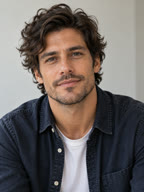
Source portrait of the performer in a denim jacket
Person A · Left
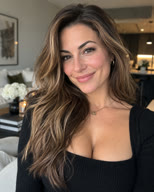
Source portrait of the performer in a black top
Person B · Right
Generated sample with sound10s · 720p · 9:16

In this take, the denim jacket and black top help distinguish the two performers as they share the microphone.

Music and voices
The model aims to generate a hip-hop beat and rap vocals. The original “Hotel Lobby” track is not included, and the template does not sync mouths to its lyrics.
Performance and movement
The template sets up a fixed camera and asks the performers to trade lines and react to each other. It uses your photos as references and does not copy the original performance frame by frame. Timing, gestures and likeness can vary.

How to make a Hotel Lobby AI video

  1. Add both portraits

    Use Person A for the performer on the left and Person B for the performer on the right.

  2. Choose your settings and generate

    Pick a Seedance model and an available output format, then check the credit quote. The scene prompt is built in.

  3. Watch and download

    Play the full result with sound and check faces, hands and timing before downloading.

What Is the Hotel Lobby AI Trend?

The Hotel Lobby AI trend draws on Quavo and Takeoff’s 2022 performance of “HOTEL LOBBY” on A COLORS SHOW. Its orange backdrop and suspended microphone became the signature look of what people also call the Migos AI trend.

COLORS later covered how creators cast new pairs in the familiar orange booth.

Original COLORS performanceCOLORS on the AI trend

Creative Ideas for Your Duo

  • A surprise debut with a friend

    Pair a portrait of you with one of a friend who wants to join in. After export, add a short title card with the duo name you came up with together.

  • An intro for a creator collaboration

    Use the duet to introduce both collaborators before the main video. Add your names in the edit so viewers can identify each person.

  • A two-person celebration

    Make a duo for a birthday or team milestone. Pick a pair of photos from the same occasion, then add the date or a short dedication in your editor.

Common Issues and How to Improve Results

  • The wrong person is on the left

    Compare the studio thumbnails with your intended lineup before submitting again. If the thumbnails are hard to tell apart, label the source files left and right before uploading them again.

  • A face or hand looks off in motion

    Pause at the point where a face or hand looks off. Try changing one input photo at a time so you can tell whether the replacement improved the next take.

Choose photos for your Hotel Lobby duo

Use one subject per photo

Pick a clear front-facing or three-quarter portrait with even lighting. Avoid group shots, covered faces and heavy filters.

Match the framing

Put the photos side by side. Two head-and-shoulders crops with space around the heads are a better starting point than a tight selfie paired with a distant shot.

Choose clothes you can tell apart

When the outfits look similar, try portraits with distinct collars or jacket colors. Visible clothing gives the model another reference for each performer.

Hotel Lobby video questions

Do the two photos need to be taken together?

You can use portraits taken separately, in different places or on different days. Use photos you have permission to animate and share.

Which aspect ratio should I choose?

Choose 9:16 for a vertical feed, 16:9 for more space beside the performers, or 1:1 for a square post, when the selected model offers it. Check the edges for cropped shoulders or gestures.

How can I add my own music or captions?

Download the clip and open it in a video editor. Add audio you have permission to use and place captions clear of both faces. Play the edit through to check the timing.

What happens to my credits if generation fails?

A confirmed failed task returns the reserved credits. If the outcome is still uncertain, the credits stay reserved while we check. Delivered videos generally do not qualify for a credit return.

How many credits does this template use?

Default settings cost 45 credits with Seedance 2.0 Fast at 10s, 720p and 9:16. Review the studio quote before generating, especially if you change the model or output settings.

Put both of you on the same stage

Bring two photos. The template takes care of the scene.

Upload two photos